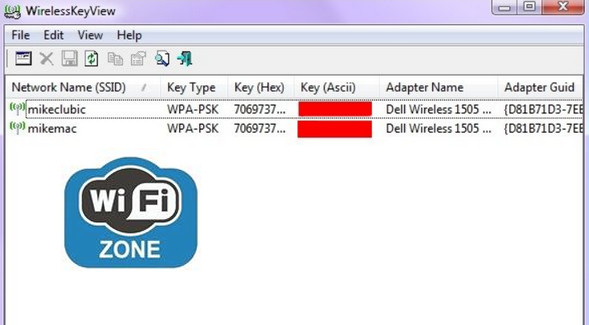
Retrieve your Wi-Fi passwords with this free, portable, and efficient software. WirelessKeyView is a tool for recovering WEP and WPA encryption keys for Wi-Fi networks saved on your PC. The application lists the networks and displays the key type, the key in hexadecimal and ASCII formats, the modem name, and more.
Simply launch the executable from your desktop or a USB drive to obtain:
– The network name (SSID),
– The type of protection (WEP/WPA),
– The complete password (Hex, Ascii),
– The name of the Wi-Fi adapter.
All you have to do is save this valuable list of passwords in a text, HTML, or XML file and keep it safe. This will allow you to connect your new machine to your preferred Wi-Fi network.
Note : To get the French language option in the software, you need to download, unzip, and copy this file in the folder containing the program.
Configuration:
– Windows (x32/x64 Bits): XP, Vista, 7, 8, 8.1, 10
– Processor: Pentium 4 3GHz
– RAM: 512 MB
– Disk space: 1 MB
Facility :
* This is a portable version: You therefore have nothing to install.
– Simply launch the file WirelessKeyView.exe
- Language : English + French
- Size : 73.5 KB
This article was updated on December 2, 2016