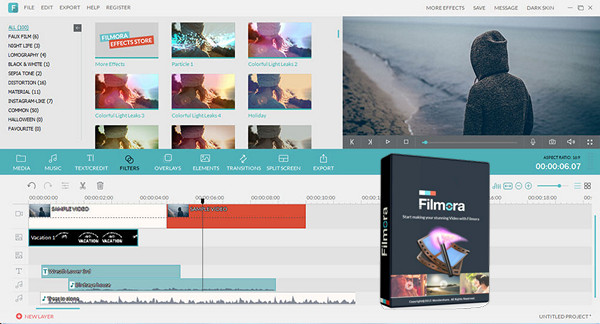
WonderShare Filmora lets you transform your personal videos into super productions with overlay text, effects, transitions, frames, music, and many other insertable elements. Simply import a video, place it on the timeline, and navigate through the various components (text, effects, picture-in-picture, transitions, movies, sound) to add them at the desired moment.
You also have the option to trim the video, insert a voiceover, or adjust the contrast, saturation, brightness, tone, and speed. A preview window makes it easy to check the changes in real time.
Edit and enhance your multimedia files:
Easily create perfect movies using your video clips (SD, HD, camcorder, discs), audio, and photos. See technical specifications. For all supported formats.
* Edit and personalize videos / photos / audio with functions such as split, crop, trim, rotate, fade in and fade out, adjust duration, etc.
* Adjust everything using the Contrast, Saturation, Brightness and Hue tools.
* One click to record videos and voiceovers with a webcam and microphone.
* Speeding up, slowing down and voice changing effects make audio/video editing fun.
* Manage all your media sources, including videos (webcam), audio, images and color slides.
* Level up instantly with over 50 ready-to-use filters and effects.
* Add transitions between clips and apply motion effects to photos to bring still images to life.
* Easily create picture-in-picture (image/video) tracks and customize them with motion, effects, and masks.
* Add text to your videos and photos with customizable fonts, colors, etc. for better video transmission.
* Drag and drop intro/credit clips to create an awesome movie.
Share your videos with family and friends in a flash:
* Get videos optimized for playback on your portable devices such as iPhone, iPad, PSP, iPod, Wii, Zune, etc.
* Save edited videos to the local hard drive for later use in a variety of video formats.
* Upload your video creation directly to YouTube and share it with more people on Facebook and Twitter.
* Burn videos to DVDs or save them as a DVD folder or ISO files to preserve the videos optimally.
Configuration:
– Windows (x64 Bits): XP, Vista, 7, 8, 8.1, 10
– Processor: Intel or AMD 1 GHz
– RAM: 1 GB
– Disk space: 1 GB
Facility :
1. Add this line to the end of host file
127.0.0.1 platform.wondershare.com
2. Install Filmora
3. Launch Filmora and click on register
4. Use the keygen to generate a code
5. Enter the code and an email address yopmail.com
* Read the file info_install.txt (Another installation method)
- Language : Multilingual (French included)
- Size : 201.7 MB
This article was updated on January 26, 2017