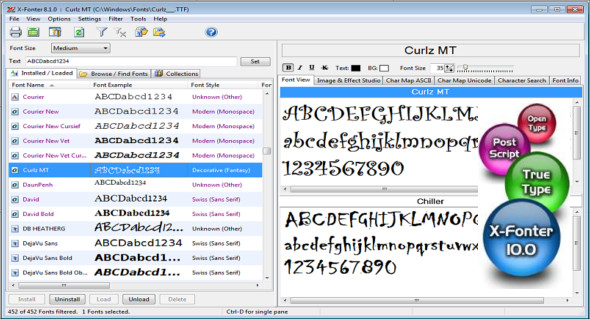
X-Fonter is an advanced font manager, specifically designed for web designers, graphic designers, and others. Its simple user interface allows you to quickly find the font you need. The program's main function is to manage your fonts (install, uninstall, load, unload, compare, and preview).
Like any decent font manager, X-Fonter supports all font types (TrueType, OpenType, PostScript Type 1, Raster, Vector). But what truly sets this product apart is its intuitive and user-friendly interface. Whether you're a beginner or a professional, X-Fonter can get the job done.
Finding the right font is often a difficult task, but X-Fonter makes it easy. You can create your own color schemes and use your own preview text. A character map is included for ASCII and Unicode, allowing you to easily see what a specific character looks like or whether that character is included in a font.
In addition, this font manager also allows you to create beautiful 3D graphics (transparent GIFs supported) that you can use for your web pages, emails, and much more.
Preview fonts
• Quickly display all installed fonts
• Search or look up fonts on any reader
• Compare fonts with custom text samples
Organize the police
• Create your own personalized collections
• Load an entire collection at once
Install the fonts
• Supports all font types
• TrueType, Opentype, Postscript, Raster, Vector
• Temporarily load the policies to save resources
Print the fonts
• Preview of print fonts or character maps
• Up to 3 lines of custom text per font
Configuration:
– Windows (x32/x64 Bits): XP, Vista, 7, 8, 8.1, 10
– Processor: 1 GHz
– RAM: 1 GB
Language : Multilingual (French included)
Size : 7.6 MB
This article was updated on September 15, 2018