Room Arranger is an easy-to-use program for interior design and planning. This application is primarily aimed at beginners and inexperienced users unfamiliar with the intricacies of working with popular CAD systems such as AutoCAD, Sweet Home 3D, SketchUp Make, etc. However, it successfully simplifies tasks such as modeling furniture placement, designing a new kitchen, or even planning your home from scratch.
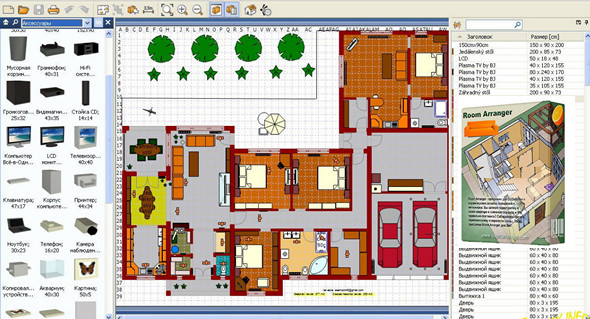
Room Arranger contains a fairly large library of different interior elementsDoors and windows, wardrobes, chairs, tables, bathroom, bedroom, kitchen, additional accessories, stairs, garden accessories, etc. It's very easy to start designing: create a new project by specifying the number of rooms and their sizes. Then, place the items you need in the application's directory. All actions are performed by simply dragging an object from the list into your room (kitchen, bathroom, hallway, etc.).
It's convenient that, when designing a private house, the plan for each floor can be combined into a single project, allowing for quick conversion to the desired layout. Furthermore, this feature is implemented in Room Arranger, along with a 3D view of the finished work, enabling you to evaluate your project more clearly and realistically.
In general, Room Arranger, although it only contains the basic features for CAD design, will nevertheless be a good assistant for anyone who likes to experiment with the design of living rooms and offices, allowing you to pre-implement your entire idea and choose the best option.
Features:
– 3D visualization
– Extended Object Library
- The measure
– Print in Scale
– Multilingual
– Build on the floor plan image
Configuration:
– Windows (x32/x64 Bits): XP, Vista, 7, 8, 8.1, 10
– Processor: 1 GHz
– RAM: 512 MB
– Disk space: 100 MB
Portable version
Run the file Room Arranger.exe
Language Multilingual (including French)
Size : 29.7 MB
This article was updated on October 1, 2017