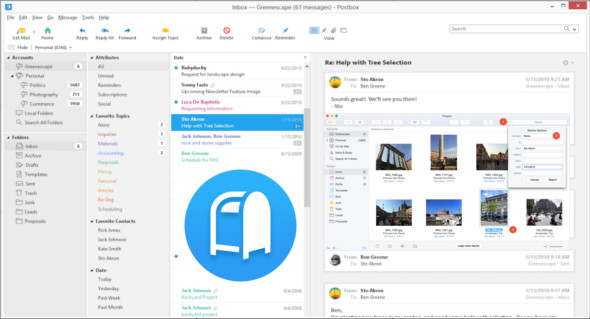
Postbox is a powerful application designed to provide you with all the tools you need to stay connected with friends and business partners. It can manage multiple email accounts and lets you subscribe to RSS feeds to read the latest news. Take control of your day with Postbox's clean and highly customizable interface. Make your email work for you, exactly the way you want it.
Simplify your view
Address what's important using Postbox's innovative Focus panel.
Filter in real time
Isolate the messages you need and filter the rest with a single click.
Organize by Tag
Label and display messages seamlessly by project, event, or organization of your work.
Organize by Contact
Group messages from your boss or VIPs to prevent your emails from getting lost.
Send large files quickly
Send links to large files in Dropbox, Box and OneDrive, instead of the files themselves.
Easily reuse attachments
Browse files or images in the editing window, reuse with a simple click.
Stay on target
Track the time and effort you spend writing messages.
Pre-saved answers
Insert predefined snippets of text, images, or HTML blocks in just a few clicks.
Never send from the wrong account
The mailbox highlights contacts when you reply to a message from the wrong account.
Edit in HTML
Edit directly in HTML using the advanced code editor.
Find things quickly
Find what you need in a flash with Postbox's ultra-fast search.
Advanced search operators
Customize searches by sender, subject, date range and other attributes.
Search for files and images
Find documents and images hidden in emails.
Group your accounts
Organize your accounts into groups, then access unified views within each group.
Quickly access your favorite folders
Quick access to your go-to folders and accounts in the favorites bar.
Open the folders in the tabs
Like a web browser, navigate through your inboxes, folders, topics or contacts in the tabs.
What's new
– Fixed a problem with the message content.
– Fixed an issue that could prevent cloud file sharing preferences from being displayed
– Fixed icons in the Filters panel for normal resolution screens on macOS
The main changes include:
– New Technology Foundation
– New themes for macOS and Windows
– IMAP limitation
– MailDir storage format
– More improvements and bug fixes!
Configuration:
– Windows (x32/x64 Bits): 7, 8, 8.1, 10
– Processor: 1 GHz
– RAM: 1 GB
– Disk space: 100 MB
Language Multilingual (French included)
Size 62.9 MB
This article was updated on April 15, 2018