MaxLauncher is designed to simplify the work of every computer user, offering one-click access to favorite folders and frequently used files and documents. With its help, you can place all your shortcuts in a single window, without cluttering your desktop or taskbar.
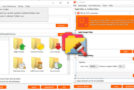
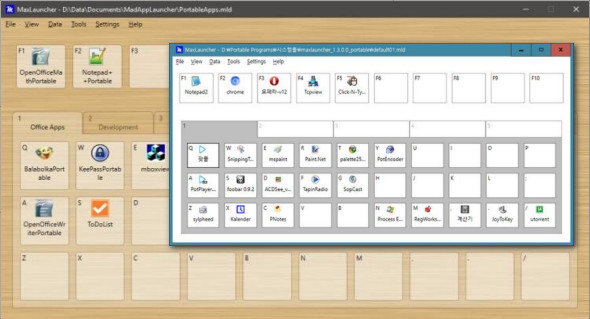
MaxLauncher displays a straightforward interface where you can create up to ten shortcuts, assigning a button to each. Editing a new shortcut is done by selecting the designated option from the context menu or simply dragging a program or folder onto one of the available buttons.
Quickly access your files and folderss
Not only does your workspace become more open and organized, but the time required to run an application or open a folder is significantly reduced, which improves workflow.
Define the position and size of open windows
Users can customize the application name and define additional runtime arguments. Applications and folders can be minimized, maximized, hidden, or in normal mode, with or without administrative privileges.
Declutter your desktop while still accessing files just as easily
With a few improvements here and there, MaxLauncher could be truly useful to any user, especially those who work with a large number of applications simultaneously. It's essentially a file and folder launcher, with accessible options and customizable appearances. Kept on top of all other open programs, it can easily encompass all the shortcuts that make your desktop look cluttered.
Features:
– Ability to launch an item (e.g., program, folder, or command) with two or three keystrokes
– Favorites bar with 10 configurable buttons, each corresponding to the F1-F10 keys
– Create up to ten tabs. Each tab contains 30 configurable buttons, for a total of 300 configurable buttons per file (*.mld). Each tab corresponds to the number 1-0, and the buttons on each tab correspond to the letters/symbols under the numeric keys.
– The data is contained in a text file (*.mld) in XML format
– Multiple files (*.mld) can be created to group other items (e.g., work, home, project1, etc.). Simply associate a *.mld file with a button to load it.
– Drag and drop support
– Support for international keyboard layouts
– Configurable shortcut key to launch the program
– Option to change the size of the initial window and the location of a program
– Ability to run multiple instances
– Ability to operate in portable mode (for example, on a USB flash drive or external hard drive)
– Supports custom themes
– Works on 32-bit and 64-bit versions
– Custom window size (v 0.3.0.0)
– Custom application icon (v 0.4.0.0)
– Read-only mode
– Multi-launch (0.7.0.0)
Configuration:
– Windows (x32/x64 Bits): XP, Vista, 7, 8, 8.1, 10
– Processor: 1 GHz
– RAM: 1 GB
Language : Multilingual (French included)
Size : 2.1 MB
This article was updated on August 5, 2018