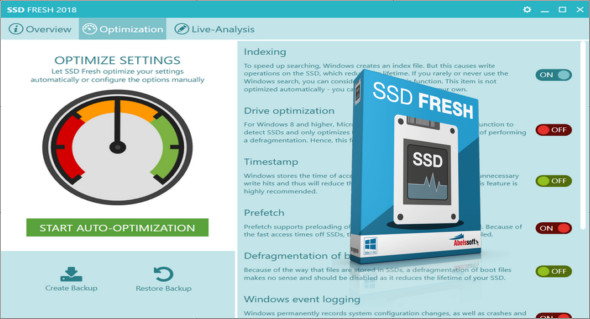
SSD Fresh adapts to your Windows system when using an SSD. SSD Fresh reduces the number of read and write operations, thus increasing the lifespan of your drive. By disabling unnecessary services, system performance also improves.
The tool also includes Windows defragmentation, file indexing, timestamping, prefetching, boot file defragmentation, Windows logging, backup, system recovery (if another backup system is used), and short name storage.
Optimize SSD settings
SSD Fresh increases your SSD's performance after a full scan by disabling unnecessary services and unnecessary write access.
Display information about the player
Get information about your drive and its manufacturer. SSD Fresh displays general information tailored to the hard drives installed in your computer; for example, you can see the storage capacity and the space used.
Display SMART data
Modern hard drives use a self-monitoring system called SMART (Self-Monitoring, Analysis, and Reporting System). It analyzes the drive and identifies potential problems before they cause data loss. SSD Fresh reads this information and displays it in the window.
Ready for Windows 10
This application has already been optimized for Windows 10. This means you don't have to worry about which Windows operating system you have installed.
Configuration:
– Windows (x32/x64 Bits): XP, Vista, 7, 8, 8.1, 10
– Processor: 1 GHz
– RAM: 1 GB
Language : Multilingual
Size : 3.4 MB
This article was updated on August 20, 2018