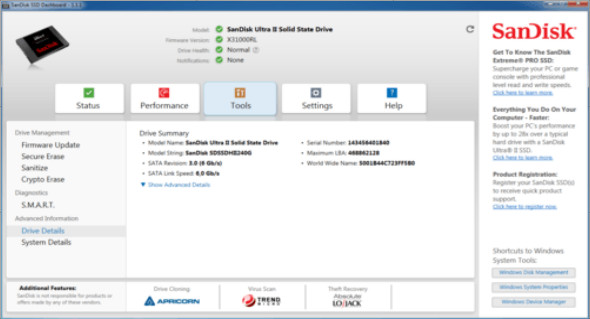
SanDisk SSD Dashboard includes drive analysis tools (including drive model, capacity, firmware version and SMART attributes) and firmware updates.
The application can also provide valuable information about your drive's overall performance. If you're not satisfied with the read and write speeds, you can use various functions to free up space. It's worth noting that the user interface also includes shortcuts to essential system tools, such as Windows Disk Management, Windows System Properties, and Windows Device Manager.
Simple configuration and simplified interface
Upon launch, the utility scans your system to detect the installed SanDisk drive and displays information about the drive model, firmware version, status, and any critical notifications. The program features a clean and elegant graphical interface that allows you to preview details of your computer and operating system.
Comes with three secure removal tools
Since keeping your disk in pristine condition involves removing obsolete data, this utility provides various tools for this purpose, namely secure erasure, cryptographic erasure, and sanitization. If you're wondering, the difference between these is that the Sanitize function can also delete mapping tables and all written blocks. The cryptographic erasure function can be used when you want to remove all security keys from the drive.
It's important to note that the application allows you to create bootable USB drives that you can use to perform the aforementioned actions, as well as to update the firmware. You'll be pleased to know that the bootable USB drive can also be used on multiple systems to erase data on different SSDs.
Configuration:
– Windows (x32/x64 Bits): XP, Vista, 7, 8, 8.1, 10
– Processor: 1 GHz
– RAM: 1 GB
Language : Multilingual (French included)
Size : 114.5 MB
This article was updated on October 13, 2018