The AnyDesk utility gives you a way to access a computer remotely, allowing you to work with various files and documents remotely. The program is fast, secure, and you can use it without any installation.
Easily browse, transfer, rename, and delete files across all your remote devices. AnyDesk's new file browsing mode lets you do all these things. Of course, you can also copy and paste files during a remote session.
Connect quickly to one or more remote computers
The application aims to help you connect to your home PC from work or vice versa, allowing you to easily access the documents you need, whenever you want, with the security of that specific drive. For this reason, AnyDesk does not offer file sharing or transfer features.
This utility allows you to share clipboard contents between two computers, making it easy to copy and paste information from one to the other. Similarly, it allows you to take screenshots of the computer you are connecting to and save them to your desktop as PNG files.
AnyDesk supports unattended access, allowing you to connect to the target PC without requiring confirmation from the other party. However, this requires you to set a password to prevent unauthorized access.
For each connection, a set of permissions can be enabled or disabled, such as the ability to hear audio, control or lock the keyboard and mouse, or access the clipboard. In addition, various other display preferences can be adjusted.
The simple and intuitive interface
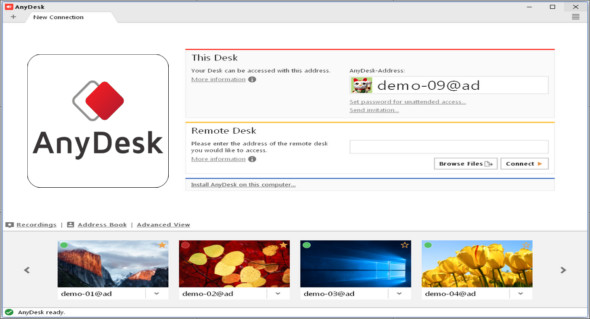
The utility has a very user-friendly and intuitive interface, making it accessible to anyone, regardless of their prior experience with similar tools. The main window allows you to connect to another computer running AnyDesk simply by entering its address in the "Remote Desktop" field.
A handy RDP tool
Overall, AnyDesk proves to be a practical and reliable program that can help you remotely connect to other PCs, allowing you to access and control the target computer with minimal effort.
Configuration :
– Windows (x32/x64 Bits): XP, Vista, 7, 8, 8.1, 10
– Processor: 1 GHz
– RAM: 1 GB
Language : Multilingual (French included)
Size : 4.0 MB
This article was updated on December 14, 2018