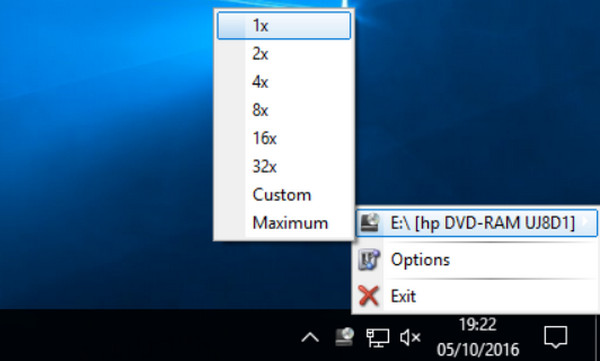
Rimhill is a utility that allows you to impose a speed limit on your computer's CD/DVD/BD optical drive. After installation, right-click on the "Rimhill" icon in the notification area (next to the clock) and configure the speed limit to apply: 1x, 2x, 4x, 8x, 16x, 32x, custom, maximum.
These restrictions prove very useful and significantly improve the chances of recovering data from very old, degraded, damaged, warped, or otherwise unsuitable CDs/DVDs. The imposed limit prevents excessive automatic speed adjustments and allows for better reading of problematic sectors on the disc.
It is also an excellent way to tame a noisy or temperamental player, and to slow down the playback of a disc that causes a lot of vibration.
It is possible to restrict an optical drive to its absolute limit of 1x, also known as "real-time." This type of drive then operates exclusively at a constant bitrate. This is, for example, the default setting for a CD-Audio player, as its bitrate has been calibrated to 150 KB/sec precisely to allow for the playback of 74 minutes of music in real time from a CD-Audio. For DVDs, the default bitrate is calibrated to 1,380 KB/sec. This setting can be desirable to stabilize an optical drive during real-time CD-Audio or DVD ripping.
Real-time reading also represents the best possible configuration for carrying out a meticulous data recovery from a damaged storage medium.
Configuration:
– Windows (32/64bits): XP/Vista7/8/10
– CPU P4 2GHz
– 128 MB of RAM
– 10 MB available on the hard drive
Facility :
1- Install via “RimhillExSetup.exe”
2- In the notification area, right-click on the "Rimhill" icon
3- Select the maximum speed to impose on the optical reader
- Language: English
- Size: 878.8 KB
This article was updated on October 5, 2016