Windows Password Recovery Tool Ultimate is a professional solution designed to help users regain access to their computers when a Windows password is forgotten, lost, or has become inaccessible. The tool allows users to reset passwords for local, Microsoft, or domain accounts, and also offers the option to create a new administrator account to quickly regain control of the system.
Simple to use and accessible even to inexperienced users, Windows Password Recovery Tool Ultimate works from a bootable disk. It allows you to access your Windows system without needing to know your old password and without reinstalling Windows. This method saves time while preventing the loss of important personal data.
The tool is particularly useful in several situations: forgetting the administrator password, being unable to access a Windows session, having an old user account blocked, having an inaccessible Microsoft account, or needing to create a new administrator account to troubleshoot a computer.
A quick solution to regain access to Windows
Windows Password Recovery Tool Ultimate allows you to reset or remove a Windows password in just a few steps. Once the bootable disk is created, the user can boot the computer from this media, detect installed Windows systems, and then choose the action to perform on the affected account.
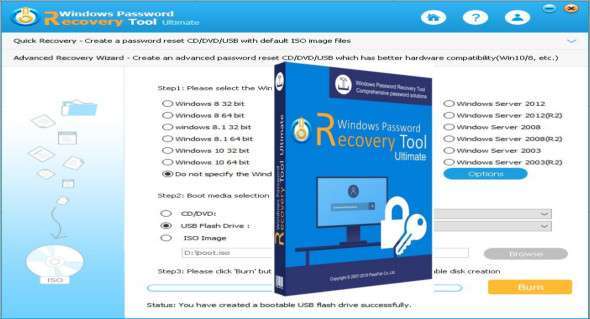
One of the main advantages of this tool is its simplicity. No advanced technical knowledge is required to use it. The interface guides the user through the entire process, from creating the bootable media to changing the password.
3 steps to reset your Windows password
1. Download and install Windows Password Recovery Tool Ultimate on an accessible computer.
2. Create a bootable disk using an ISO image, USB flash drive, or CD/DVD.
3. Start the locked computer from this media, then reset or remove the Windows password.
How Windows Password Recovery Tool Ultimate Works
Windows Password Recovery Tool Ultimate automatically scans the Windows installations on the computer. Once the system is detected, it displays the available user accounts, including administrator accounts, local accounts, guest accounts, and, depending on the configuration, certain domain-linked accounts.
The user can then choose the desired action: delete a password, replace it with a new one, create an administrator account, or manage existing accounts. This approach allows for quick recovery of access to Windows without requiring a complete system reinstallation.
The tool can be used on different versions of Windows, including Windows 7, Windows 8, Windows 10 and other compatible editions depending on the software version.
Resetting a local account password
Windows Password Recovery Tool Ultimate supports local Windows accounts. It can be used to reset or remove the password for an administrator account, a standard user account, or a guest account.
Administrator account : the tool allows you to remove or change the local administrator password in order to regain full access to the computer.
Microsoft account It can also help to change offline the password associated with a Microsoft account used to sign in to Windows, depending on the features supported by the version used.
Guest account : if a local guest account is password protected, Windows Password Recovery Tool Ultimate can also remove or reset it.
This feature is useful when the user can no longer log in to Windows, but wants to keep their files, software and existing configuration.
Domain account management
For business environments, Windows Password Recovery Tool Ultimate also offers options for domain accounts. These features can be useful in certain system administration scenarios, particularly when a domain administrator account becomes inaccessible.
Domain administrator account : the tool can help to remove or change the password of a domain administrator account, as well as other user accounts linked to Active Directory, depending on the environment and available rights.
Create administrator account : in case of a compromised, lost or unusable account, it is possible to create a new administrator account in order to restore access to the system.
These options should only be used on systems that you own or for which you have explicit authorization. They are particularly suited to technicians, IT administrators, and maintenance departments.
4 professional password recovery solutions
Windows Password Recovery Tool Ultimate offers several methods to regain control of a locked Windows computer.
Remove Windows password This option allows you to access the computer without entering the old password. It is useful when the password has been completely forgotten.
Reset or change your password : the user can replace the old password with a new one in order to log in to Windows normally.
Create a new local or administrator account : if the main account is unusable, it is possible to create a new account with administrator rights to access the system.
Manage login accounts : the tool also allows you to manage the accounts available on the computer, in particular to delete some unnecessary accounts or keep only those that are necessary.
A practical tool for individuals and professionals
Windows Password Recovery Tool Ultimate is designed for both individuals and IT professionals. For personal users, it allows for quick recovery of access to a locked computer after a forgotten password. For professionals, it can be used for maintenance, troubleshooting, or access recovery on Windows workstations.
The main advantage of this solution is that it often avoids a complete system reinstallation. Users can thus keep their files, programs, and settings while restoring access to their Windows session. You can also explore an interesting alternative with Lazesoft Windows Recovery Unlimited.
Conclusion
Windows Password Recovery Tool Ultimate is a comprehensive solution for resetting, removing, or changing a forgotten Windows password. Thanks to its bootable disk functionality, it allows you to recover access to a local account, administrator account, guest account, or domain account, depending on your needs.
Easy to use, fast, and suitable for various troubleshooting scenarios, this tool offers an effective solution for restoring access to a Windows computer without data loss. It is suitable for both home users and professionals seeking a reliable method for managing Windows password issues.
Version : Unlimited 8.5.1.0
Language : Multilingual (French included)
Size : 50.33 MB
Configuration:
– Windows (x32/x64 Bits): 7, 8, 10, 11
Download Windows Password Recovery Tool Ultimate v8.5.1.0
This article was last updated on May 11, 2026