
Lazesoft Windows Recovery Suite is an essential tool for home and business users, providing comprehensive solutions for resolving Windows startup issues, restoring partitions, recovering lost files, and more. It supports WinPE USB boot disks.
You can use Lazesoft Windows Recovery to resolve all startup problems and system crashes, avoiding the need to reinstall Windows. The program can fix blue screen issues, boot failures, virus effects, and more. It offers the option to create a backup of your Windows system or entire disk, allowing you to undo recent operations, including the results of any repairs. You can also download it. Windows Password Recovery Tool Ultimate.
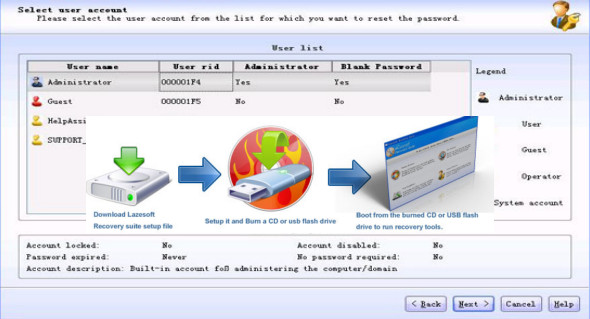
Create a recovery (bootable) CD or a USB drive
– Lazesoft Recovery Suite is capable of fully booting from a Lazesoft Recovery Suite Live CD
– Supports various brands of desktop and laptop computers.
– With the WinPE and Linux-based bootable disk builder
– Quickly, easily, and natively create a PE recovery disk on 64-bit Windows Vista, 7, 2008, 8, 10, 11
– Improved WinPE Builder.
– Improved Media Builder graphical interface.
Fix startup problems with Lazesoft Recovery
– Recover Windows from critical system errors when BSOD or a black screen is displayed.
– Recover the MBR even if a boot virus has corrupted the MBR.
– One-click repair of the Windows system partition boot sector
– Recover missing or corrupted Windows system files such as “ntldr is missing”, “bootmgr is missing”, etc.
– Recovery or modification of the corrupted registry, registry key value infected by a virus.
– Modify and repair the Windows boot.ini or BCD startup file
Recover your critical data with Lazesoft File Manager
– Access and copy files from the computer even if Windows cannot start.
– Boot from the recovery CD or USB drive to copy the files to another local drive.
Registry editor and registry recovery
– View and modify the settings of any Windows system registry in offline mode.
– Automatic recovery of the corrupted registry to its previous normal state
– After the recovery, you even had the option to cancel the registry recovery operation.
Undo partition deletion
– Recover the partition after accidental deletion or damage to the partition table
– Preview the partition files before saving them.
– Supports FAT and NTFS partitions.
Version : Technician 5.3.0.1 /Portable: Technician 5.3.0.1 /WinPE: Technician 5.3.0.1
Language : English
Size : 77.81 Mo /Portable: 110.27 Mo/WinPE: 526.74 Mo
Configuration:
– Windows (x32/x64 Bits): 7, 8, 10, 11
Download Lazesoft Recovery Suite Technician v5.3.0.1
Download Lazesoft Recovery Suite Technician Portable v5.3.0.1
Download Lazesoft Windows Recovery WinPE Technician v5.3.0.1
Cet article a été mis à jour le 6 September 2026