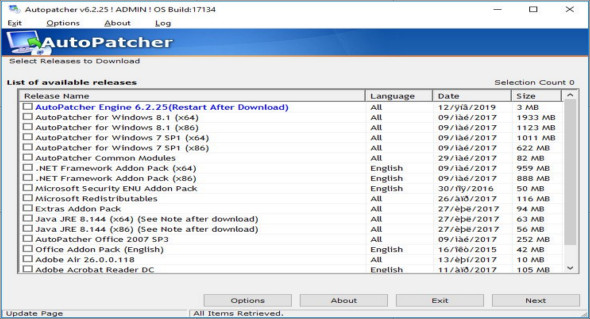
AutoPatcher Updater is a simple application that can detect necessary system updates and download them easily and quickly from the internet. The interface is clean and simple, displaying nothing more than a list of available updates for your system and a button to access the "Options" section. To detect available updates, the application checks AutoPatcher servers for the latest module versions and allows you to download the ones you need.
The list of available versions displays the version name, language, and date of the most recent update. It includes patches for the AutoPatcher engine, AutoPatcher for Office, add-on packs for Office, DirectX updates, add-on packs for .NET Framework, Adobe Air and Adobe Reader, as well as Microsoft redistributables and original registry changes.
After you select the versions you want to download, the application begins retrieving the corresponding files from the internet, one by one, from the developer's server. Depending on the number of files you choose and their size, the download process will take more or less time.
The application comes with an option to remember previous selections, which is a real advantage. You can use this feature with the automatic command-line switcher to automatically download updates. Furthermore, it can connect to download servers using proxies to hide your identity.
The AutoPatcher Updater tool doesn't provide a wide range of components to update, but you can use it to quickly download the latest version of certain important Windows components without having to search for the installation package online. It's a handy tool that can keep your system up to date, which could prevent attacks due to exploitable vulnerabilities.
Configuration :
– Windows (x32/x64 Bits): XP, Vista, 7, 8, 8.1, 10
– Processor: 1 GHz
– RAM: 1 GB
Language : English
Size : 3.0 MB
This article was updated on January 20, 2019