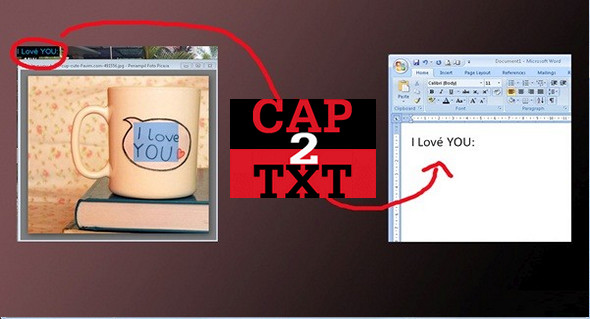
Capture images of text anywhere on your screen and save the result to the clipboard by default, then paste into any text editor.
Capture2Text is a practical and efficient application whose main purpose is to capture specific areas of your desktop and perform optical character recognition (OCR) operations, then save the results to the clipboard and all you have to do is copy your capture into a text editor.
The application uses keyboard shortcuts; it is highly recommended that you familiarize yourself with these shortcuts and other settings. You can define your own shortcuts to capture the desired area.
After launching Capture2Text, it automatically redirects to the taskbar menu so as not to disturb you, unless you toggle the specified keyboard shortcut. You won't even know the application is still running. You can then access the software settings and configure French as the language to be recognized.
ORC language Chinese, English, French, German, Japanese, Russian and Spanish.
Use :
To capture text from an image, position your cursor in the top left corner of the text you want to extract. Press Windows+Q. Move your cursor again to locate the blue capture area. Adjust it to the text you want to copy, left-click, and you're done.
Configuration:
– Windows (x32/x64 Bits): XP, Vista, 7, 8, 8.1, 10
– Processor: 1 GHz
– RAM: 512 MB
– Disk space: 50 MB
Portable version:
Run the file Capture2Text.exe (32-bit or 64-bit folder depending on your system)
Language : English
Size : 107.8 MB
This article was updated on April 5, 2017