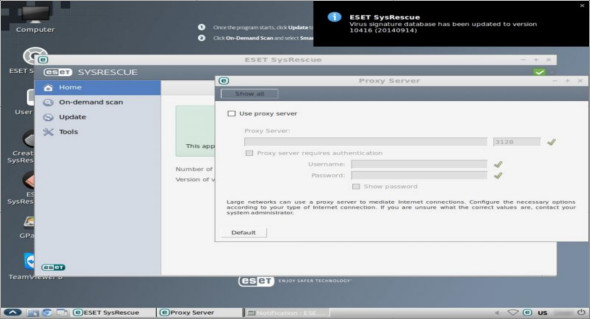
ESET SysRescue aims to scan your computer and remove malicious components that could affect its operation. Its main advantage lies in the fact that it operates outside the operating system, directly accessing the file system and hard drive to perform in-depth, on-demand scans of the boot sector or existing partitions.
ESET SysRescue can be deployed to a USB flash drive, CD, or DVD. Thanks to the wizard-style interface of Live USB Creator, creating a bootable USB drive is a simple task.
However, please note that the drive will be formatted. Therefore, ensure you have created a backup of your data. You can also mount the available ISO image and then boot ESET SysRescue.
Scan your PC to detect various threats
You can use ESET SysRescue to run smart or custom scans of your computer to detect and completely eliminate traces of viruses and other types of threats that can endanger data integrity and affect the operation of your PC.
You can choose from different scan profiles, and the application allows you to customize them by selecting the folders or files to include in the scan. It may only retrieve information about potentially dangerous files without actually deleting them from your PC.
The analysis results are saved to a file, and the application can display detailed statistical data and informative graphs regarding system protection. Quarantined items can be browsed, restored, or deleted with a single click.
Create your ESET SysRescue Live disk:
Download ESET SysRescue Live CD/USB creator
• Run the LiveUSBCreator file
• Choose “Create a USB drive” or “Create a CD/DVD” and select the desired media.
• Create your ESET SysRescue Live CD/USB drive
• In addition, you can use a separate ISO image (in the archive).
Scan any PC with ESET SysRescue Live:
• Insert your ESET SysRescue Live CD/USB drive and restart
• Select “Run ESET SysRescue”
• Once the program has started, click on "Update" to download the latest signatures.
• Click on “On-demand scan” and select “Smart scan” or “Custom scan”.
Configuration:
– Processor: 1 GHz
– RAM: 1 GB
Language : English
Size : 571.0 MB
This article was updated on November 5, 2018