
True friends are for life. But not necessarily on Facebook.🙂 Do you sometimes notice your number of Facebook friends decreasing on its own day by day? And you'd like to answer this question: Who dared to...? remove from Facebook ? 🙁
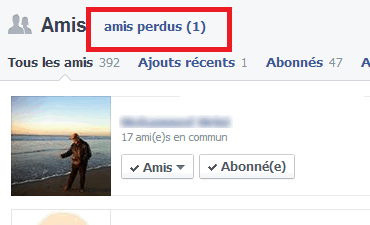
That's exactly what it allows you to do Who Deleted Me, an extension that integrates perfectly into your browser interface and then adds a section "Who Deleted Me" This allows you to see which contacts have removed you from their friends list. You will receive a notification each time you are removed.
Who Deleted MeIt analyzes contact lists upon installation to clearly show the number of friends lost over time and with use. It offers to notify you of any account deletions from your contacts or of pending or declined friend requests.
It only works for Chrome, Firefox, and Opera browsers. There is also an app for iOS and Android mobile devices.
Implementing the "Who Deleted Me" application is very simple. Just go to the website: http://www.deleted.io and install the extension. On the Play Store, the app is called "Who Deleted Me on Facebook". You will need to log in to your Facebook account. Once logged in, you will see an additional icon in the top right corner of your browser that displays the number of your friends.
You can then see your new friends and the people who have deleted you since you set up Who Deleted Me. You will also be notified if your name is removed from a friend list.

This article was updated on January 3, 2016