
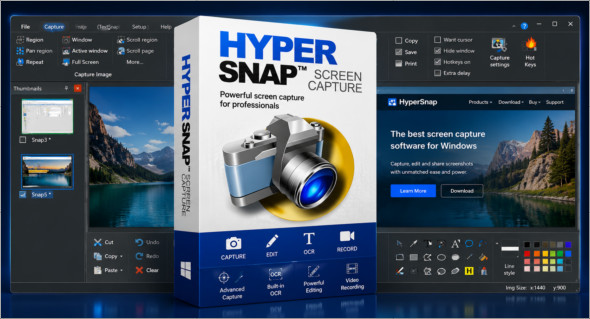
HyperSnap is a screen capture and video recording software designed to easily capture any area of the screen. It allows you to capture standard windows, custom areas, temporary menus, drop-down menus, multi-monitor setups, and even elements that are difficult to capture with Windows' built-in tools. Thanks to its flexibility, it is suitable for both everyday users and professionals who need to create tutorials, documentation, bug reports, or training materials.
One of the great advantages of HyperSnap Its strength lies in its ability to capture what the Print Screen key can't always capture accurately, such as long scrolling windows, drop-down menus, or certain temporary interface states. The software also includes an OCR function that allows you to extract editable text from a screenshot, image, or screen area. For those also looking for a screen recording solution, you can also use ApowerREC : https://www.trucnet.com/apowerrec/
Key features of HyperSnap
Advanced screenshot : HyperSnap allows you to capture a window, a specific area, a complete screen, a scrolling content or an interface that is difficult to capture with standard tools.
Capture of scrolling windows : the software is very useful for capturing long pages, configuration windows, documents or dialog boxes that do not fit entirely on the screen.
Integrated OCR : HyperSnap can extract text from a capture, image, or locked interface when classic copy-paste doesn't work.
Screen video recording : in addition to still captures, the program can record videos from different areas of the screen, useful for demonstrations or visual explanations.
Capture of menus and temporary elements : it can capture drop-down menus, floating windows and interface states that disappear quickly.
Multi-screen support : HyperSnap is suitable for users working with multiple monitors, particularly for technical documentation or IT support.
Built-in annotation tools : after capture, it is possible to add arrows, notes, highlights, frames, shadows, stamps or adjustments without opening another graphics software.
Automated workflows : the software supports keyboard shortcuts, automatic saving, clipboard integration and quick export to speed up repetitive tasks.
Ideal for documentation HyperSnap is suitable for technical writers, support teams, developers, trainers, QA testers and visual content creators.
Conclusion
In conclusion, HyperSnap is a complete solution for capturing, annotating, recording, and visually analyzing everything that appears on the screen. Thanks to its advanced capture capabilities, OCR, instant editing tools, and support for challenging scenarios, it proves particularly useful for documentation, technical support, tutorials, software testing, and professional presentations.
Version : 10.2.1
Language : English
Size : 36.62 Mo
Configuration:
– Windows (x64 Bits): 10, 11
Download HyperSnap v10.2.1 + Portable
Cet article a été mis à jour le 30 July 2026