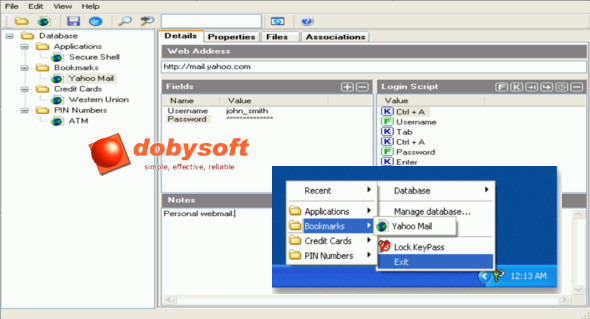
KeyPass is software that saves and secures your passwords for future use without needing to be rewritten. You can manage them as you wish across all browsers and several other programs using user-defined keyboard shortcuts. Password storage and use are encrypted using the 448-bit Blowfish algorithm, and a master password is required to unlock the information in the database. You can be confident that only you have access to sensitive information such as passwords, credit card numbers, PINs, and documents.
KeyPass can be installed on external storage devices such as USB flash drives. Unlike other password managers that write configuration information to the Windows registry, KeyPass stores everything in an encrypted database so it can be run without prior installation. This allows you to carry all your sensitive information with you wherever you go. Simply plug the device into any PC and instantly access all your information and passwords!
KeyPass is ideal for enterprise administrators to distribute passwords to users. Instead of forcing users to remember passwords, an administrator can store them in KeyPass, assign a read-only password, and distribute them to users. This way, users can access the information in KeyPass but cannot modify it. Only the administrator has the right to update the database. Changes can also be seamlessly distributed to users by synchronizing KeyPass with a reference database on a remote network share.
What's new ?
When "Disable keyboard/mouse during data entry" is enabled, KeyPass attempts to hide the mouse cursor during data entry. This has been found to cause problems on some systems (for example, those with high DPI displays). This version disables this logic to mitigate the issue.
Configuration:
– Windows (x32/x64 Bits): XP, Vista, 7, 8, 8.1, 10
– Processor: 1 GHz
– RAM: 1 GB
Language : English
Size : 2.7 MB
This article was updated on July 20, 2018