Microsoft PowerToys is a suite of utilities that allows advanced users to fine-tune and simplify the Windows experience. It provides users with ways to extract more efficiency from the Windows 10 architecture and customize it for individual workflows.
PowerToys offers useful little utilities that allow you to further customize Windows. The Windows 10 PowerToys suite includes the Windows Keyboard Shortcuts Guide, as well as "FancyZones," which let you define predefined areas where you can insert applications that will then expand and fill the predefined zone.
Current PowerToy utilities:
– FancyZones
FancyZones is a window manager that makes it easy to create complex window layouts and quickly position windows within those layouts.
– File Explorer add-ons (preview panes)
File Explorer add-ons are currently limited to additions to the Preview pane. The Preview pane is an existing File Explorer feature. To activate it, simply click the View tab in the ribbon, and then click "Preview pane".
PowerToys will now allow previewing two types of files: Markdown (.md) and SVG (.svg).
– Image Resizer
Image Resizer is a Windows Shell extension for quickly resizing images. With a simple right-click in File Explorer, resize one or more images instantly.
– Keyboard manager
Keyboard Manager lets you customize your keyboard for increased productivity by remapping keys and creating your own keyboard shortcuts. This PowerToy requires Windows 10 version 1903 (build 18362) or later.
– PowerRename
PowerRename is a Windows Shell extension for advanced batch renaming using search and replace or regular expressions. PowerRename allows for simple search and replace or more advanced expression matching. As you type in the search and replace input fields, the preview area shows what the items will be renamed to. PowerRename then calls the Windows Explorer file operations engine to perform the renaming. This has the advantage of allowing the renaming operation to be undone after PowerRename is closed.
– PowerToys Run
PowerToys Run is a new toy in PowerToys that can help you instantly search for and launch your application with a simple Alt+Space and start typing! It's open source and modular for additional plugins. Window Walker is now included too! This PowerToy requires Windows 10 version 1903 (build 18362) or later.
– Shortcut Guide
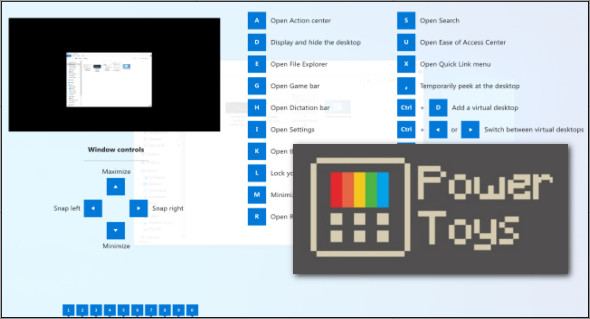
The Windows keyboard shortcut guide appears when a user holds down the Windows key for more than one second and displays the shortcuts available for the current desktop state.
Version : 0.19.1
Language : English
Size : 18.85 MB
Configuration:
– Windows (x64 Bits): 10
Microsoft PowerToys for Windows 10 v0.19.1
This article was updated on July 12, 2020