NoxPlayer (Nox App Player) is a free Android emulator that allows users to create an Android environment directly on their Windows systems. With this program, users can enjoy the full Android experience on their personal computers and easily install and try Android apps and games.
The tool comes with immediate Google Play integration. Some of its competitors may not. Therefore, users can not only load APK files already stored on their computer, but also download and install software from the official store.
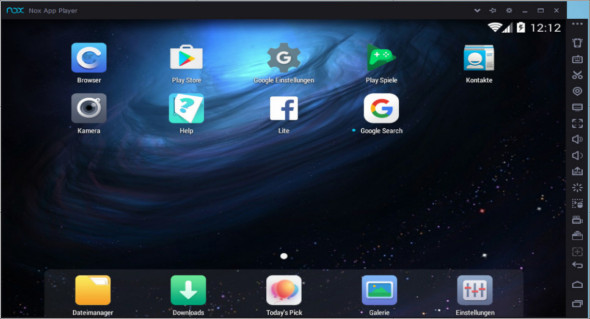
Very easy to install and use, NoxPlayer requires no technical knowledge to operate or configure. The Android environment loads automatically and displays the main Android home screen on your computer, just like your customized Android mobile device. The emulator's interface closely resembles that of real Android devices, and users can even switch to a touch input method to fully replicate the Android experience.
Testing Android apps and games
This tool can be very useful for testing newly developed applications, but it is also intended for those who are only looking to play Android games using their computer's keyboard and mouse.
Nox App Player comes with a multiplayer mode, which allows users to run multiple instances of the emulator simultaneously on the same computer screen. This means each instance of Nox App Player can run a different application or game in the foreground and monitor them simultaneously.
Connecting gamepads and controllers
The emulator was designed to support the connection of gamepads and controllers. It also offers full support for the computer keyboard, which can be useful when playing ARPGs (action role-playing games).
The emulator allows users to choose a location for their virtual device and also provides access to all the settings and configuration options that a real Android device would offer.
A robust development tool
Overall, Nox App Player is a powerful Android emulator that allows users to run Android apps and games directly on their computers. It's an attractive entertainment tool, but it can also prove to be an excellent Android app development utility, as it allows programmers to test their new applications in a complete environment.
Features
– Developed on the Android 4.4.2 kernel
– Integrated Google Play Store
– Supports input/output devices, gamepad and controller
– Multiplayer mode that can be easily activated
– Customize CPU/RAM usage and resolution
Configuration :
– Windows (x32/x64 Bits): XP, Vista, 7, 8, 8.1, 10
– Processor: 2 GHz
– RAM: 2 GB
Language : English
Size : 322.5 MB
This article was updated on January 23, 2019