
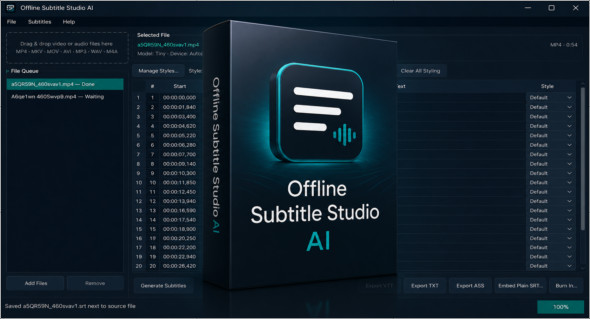
Offline Subtitle Studio AI is a Windows software designed to automatically create subtitles from video or audio files, while maintaining complete control over privacy. Unlike online services, it runs locally on your computer using AI speech recognition based on faster-whisper and CTranslate2. Your videos, audios, transcripts, and subtitles therefore never leave your PC, making it an attractive solution for creators, professionals, and users concerned about protecting their files.
The software allows you to generate subtitles, correct the text, adjust timing, apply styles, and export the result in several popular formats. Simply drag and drop a file into the application, start the transcription, and then edit the segments in a clear subtitle table. Offline Subtitle Studio AI can export to SRT, VTT, TXT, or ASS, create a separate subtitle file compatible with players like VLC, embed a selectable subtitle track, or burn the subtitles directly into a new video without altering the original.
Key features of Offline Subtitle Studio AI:
- AI-powered subtitle generation directly on Windows.
- 100% offline operation to protect your files.
- Local speech recognition based on faster-whisper and CTranslate2.
- No video, audio or transcripts are sent to an external server.
- Compact model included for initial use entirely offline.
- Larger models available as options: Base, Small, Medium and Large-v2.
- Download the templates once from Hugging Face, then use them offline.
- Works on CPU by default.
- Acceleration possible with a CUDA-compatible NVIDIA card.
- Precise word-level timing for more natural-sounding subtitles.
- Editable subtitle table to correct text and tenses.
- Batch queue for processing multiple audio or video files.
- ASS style presets with choice of font, size, color, outline and position.
- Export in SRT, VTT, TXT and ASS.
- Option to create a sidecar file, integrate a track or burn subtitles.
- Supports common formats such as MP4, MKV, MOV, AVI, MP3, WAV and M4A.
- One-time purchase, no subscription, no advertising, no account and no telemetry.
Offline Subtitle Studio AI is designed for YouTubers, video editors, podcasters, trainers, agencies, freelancers, and content creators who need reliable subtitles without relying on a cloud service. It's also useful for accessibility, archiving, training videos, and confidential projects.
Note that there is also AI Audio To Text Generator ProAnother solution dedicated to audio-to-text transcription. You can discover it here: https://www.trucnet.com/ai-audio-to-text-pro/
Offline Subtitle Studio AI is a complete solution for generating, editing, styling, exporting, embedding, or burning subtitles with AI, all while keeping the files local on your PC. Simple, private, and subscription-free, it's perfect for creators who want to produce subtitles offline quickly and securely.
Version : 1.0.3
Language : English
Size : 1.29 GB / Portable: 1.80 GB
Configuration:
– Windows (x64 Bits): 10, 11
Download Offline Subtitle Studio AI v1.0.3
Download Offline Subtitle Studio AI Portable v1.0.3
This article was updated on July 1, 2026