The most advanced edition with support for network recovery for businesses that need to recover, protect and wipe multiple workstations.
The Enterprise Edition allows for the recovery as well as the permanent deletion of data in VMware environments.
Supports software and hardware RAID recovery and optimized recovery tools: email recovery, hexadecimal viewer, SMART registry test, block usage and bad block diagnostics, imaging tools, disk copy and refresh.
Recover data from external and local hard drives (including SSDs), optical and digital media, iPods, mobile phones functioning as removable storage, and disk images.
With Ontrack EasyRecovery, you can recover your deleted photos, files, documents, videos and music files.
Ontrack EasyRecovery can scan all volumes of a local computer and build the tree of lost and deleted files.
Users can search for lost and deleted files by file names.
The analysis engine allows you to quickly compile a list of files, with an intuitive file manager.
It is possible to preview most of the recovered files.
Furthermore, all recovery operations are secure, insofar as
Ontrack EasyRecovery does not write the recovered data to the disk it analyzes.
The user can select any drive as the destination for the recovered data.
including a network drive, removable media, etc.
The data is protected by a standardized system write API that minimizes the risk of disk corruption.
There are no limitations on file and drive size.
FEATURES:
– Supports Windows 95, Windows 98, Windows NT, Windows ME, Windows 2000, Windows XP, Windows Vista, Windows 2003, Windows 7, Windows 8 and all versions of Windows Server (Windows version),
– Supports 64-bit Windows,
– Supports Mac OS X 10.4 or higher (Mac version),
– Proactive monitoring of the health status of the hard drive (HDD / SSD),
– Permanent and secure erasure of data,
– Enables the recovery of locally stored VMDK files (Enterprise version),
– Permanent and secure erasure of data on virtual disks. (if Ontrack EasyRecovery is launched from the virtual machine)
– Data recovery on virtual machines if Ontrack EasyRecovery is launched from the virtual machine (Enterprise version),
– Network support for remote system recovery (Enterprise Edition),
– Software and hardware RAID recovery, including striped (RAID 0) and mirrored (RAID 1) disks (Enterprise Edition),
– Data recovery from disk image files (Encase E01, RAW, AFF and WinHex) (Enterprise and Professional editions),
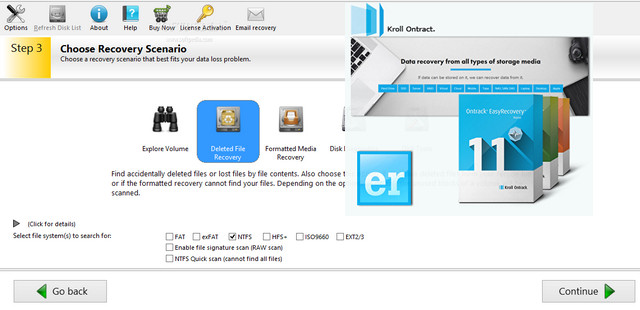
– Easy to use thanks to its fully automated assistant that guides the user throughout the entire process,
– Data protected by a standardized system write API that minimizes the risk of disk corruption,
– Data recovery from Windows® FAT12, FAT16, FAT32, NTFS and NTFS 5 file systems,
– Data recovery from Mac OS HFS/HFS+, HFS+, HFSX and HFS Wrapper file systems,
– Recovery from the emptied Recycle Bin, via command line and Windows Explorer (Windows version),
– Recovery from the Recycle Bin or from applications (Mac version),
– No size limitations for files and drives associated with DOS programs,
– Recovery of formatted drives,
– Recovery of lost partitions,
– File recovery from a unique signature, enabling the recovery of raw data,
– Data recovery from all types of digital media, including hard drives and SSDs, flash memory devices, external USB devices, and all other types of removable media.
– Preview of files before recovery,
– Supports SATA, IDE and SCSI interfaces,
– Simplified automatic update notifications,
– Recovery of CDs/DVDs (ISO 9660/UDF combined with ISO 9660) and Linux media (Ext2/3)
ADVANCED TOOLS:
Email retrieval: allows the user to view the selected email database.
Existing and deleted emails are then displayed and can be printed or saved to the hard drive.
Hexadecimal viewer: displays the selected disk in a hexadecimal viewer for manual data searching.
SMART: displays a graphical representation of the selected disk with free, used and defective blocks.
It also displays the hard drive's SMART attributes, allowing the user to check the drive's settings.
such as disk temperature, power consumption, error rate…
This allows the user to monitor the health of the storage system and prevent potential failures.
Disk Images: Select this option to restore a disk image to another disk.
Warning: The destination hard drive will be overwritten and all data on it will be erased!
Disk copy: Select this option to copy one disk to another.
Warning: The destination hard drive will be overwritten and all data on it will be erased!
Disk refresh: This function allows rewriting and verification of archive media blocks.
Hard drives are designed for regular use and not to be stored on a shelf for months or years.
The magnetic force of digital data recorded on a reader decreases when it is disconnected from a computer.
After a few months the data may become unreadable…
Minimum system requirements and compatibility:
– Windows XP, 7, 8, 8.1, 10, Server 2003/2008 (32-bit & 64-bit)
– 500 MHz processor
– 512 MB of available RAM
– 1024×768 compatible video card
– 30 MB of free hard drive space for program files
Installation and activation:
A keygen is a false positive, so temporarily disable your antivirus during download and activation.
1. Install the program by launching the file "ER_WIN_ENT.exe".
2. Copy the complete activation link by right-clicking on the URL displayed in the activation dialog box.
and paste the activation URL into the Keygen to generate an activation.
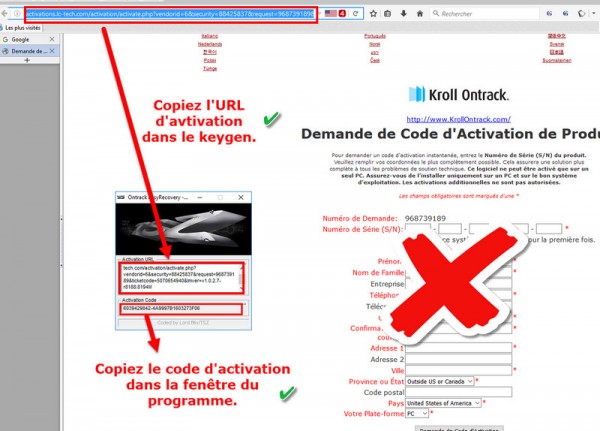
3. Enter the activation code for your system.
The activation code is specific to each PC, so use the keygen on the PC where you want to activate the program.
- Language: French / Multi
- Size: 24.92 MB
This article was updated on November 25, 2016