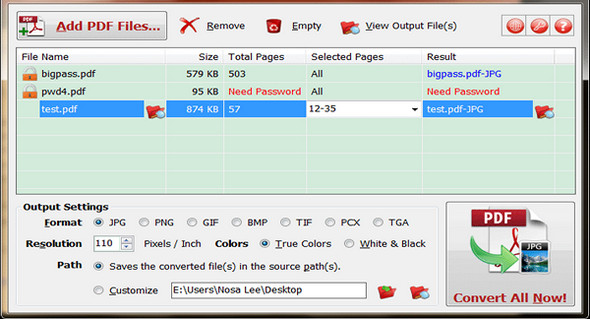
PDF to X is a converter that converts PDF documents to Word (.doc) / WordPad (.rtf) documents, HTML web pages, JPG / PNG / BMP / TIF / GIF / PCX / TGA images, and text files in batch mode. It works without Adobe Acrobat or Adobe Reader and features a user-friendly interface, a small size, and fast, accurate conversion capabilities.
It preserves as much as possible the original text, images, format and layout of the PDF documents in various output files.
In addition, PDF to X supports the conversion of password-protected PDF files and the specification of the conversion range (for DOC, RTF, JPG, GIF, PNG, BMP, TIF, PCX, TGA files) and supports the conversion of PDF files where restrictions such as copying content, saving as text, extracting pages, and printing are not allowed (for HTML and TXT files).
If you want to edit PDF files in MS Word or WordPad, publish PDF content as HTML web pages on the web, capture PDF documents, have your document management system support PDF search, or want to extract text from PDF files, it could be useful.
A utility that does not require installation (Portable application) – You can run the program directly from a USB flash drive, network drive or domain login script.
Main features
– Support converting PDF documents to Word (*.DOC), WordPad (*.RTF), HTML, JPG, GIF, PNG, BMP, TIF, PCX, TGA and TXT files.
– User-friendly, small, precise and fast interface.
– Works in batch mode.
– Works without Adobe Acrobat or Adobe Reader.
– Preserves as much of the original text, images, format and layout as possible in the output files.
– Supports conversion of password-protected PDF files (for DOC, RTF, JPG, GIF, PNG, BMP, TIF, PCX, TGA formats).
– Supports the range of pages to be converted (for DOC, RTF, JPG, GIF, PNG, BMP, TIF, PCX, TGA formats).
– Converts all pages of a PDF file into a single HTML / TXT / RTF / DOC file.
– Supports conversion of PDF files with certain restrictions, such as "Copy content", "Save as text", "Extract pages", "Print" are not allowed (for HTML and text files).
– Portable version
Configuration:
– Windows (x32/x64 Bits): XP, Vista, 7, 8, 8.1, 10
– Processor: 1 GHz
– RAM: 512 MB
– Disk space: 1 GB
Facility :
1. Run the file PTX.exe
2. Enter a key that is located in the file key.txt (for 1 PC or more) then click on OKEnter your E.Name Twice for confirmation.
Language Multilingual (French included)
Size 6.3 MB
This article was updated on March 15, 2017