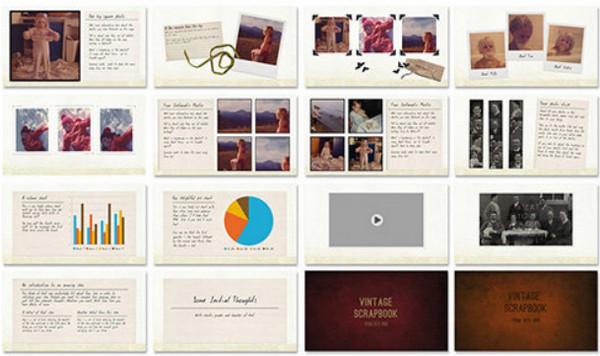
If you want a superb, professional-quality PPT for yourself, or to send to your family and friends, then grab your mouse and have fun…
All you have to do now is choose your photos, prepare your texts, and insert them into the boxes of the template already provided for this purpose.
This template comes from GraphicRiver, a guarantee of quality and professionalism.
A very well-illustrated PDF help file (in English) will guide you step by step and provide links to 3 or 4 (free) fonts to download.
This template comes in 2 colors: 1 dark and 1 light with numerous PNG images to enhance and personalize your pages.
It is obvious that you will need Microsoft PowerPoint to be able to use this template.
OpenOffice also allows you to edit PPS files. In fact, it supports PPS very well (as well as Microsoft PowerPoint). It has its own file format, which is lighter, more open, and better documented. It opens the PPS file as if it were a PPT file; you simply press F5 to display the slideshow. It handles far fewer effects than PowerPoint, so complex effects may not appear when viewing the slideshow.
Facility:
Microsoft PowerPoint required, or OpenOffice (with restrictions on effects).
No installation required…
No protection.
- Size: 324.6 MB
This article was updated on August 12, 2016