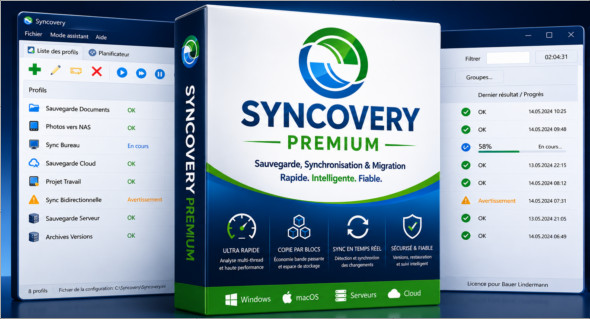
Syncovery Premium is a powerful backup, synchronization, and file migration software designed for users who want to keep their data organized and secure. It allows you to create step-by-step synchronization profiles with two main locations: a source and a destination, or two folders (left/right) in the case of bidirectional synchronization. Thanks to this flexible approach, it can be used to back up important documents, synchronize multiple drives, copy files to a server, or keep folders up-to-date across different storage devices.
One of Syncovery Premium's major advantages is its speed. Its multi-threaded scanning algorithm allows it to analyze very large volumes of files, even those with millions of items or numerous subfolders. The software also offers advanced features such as block copying, real-time synchronization, intelligent tracking of moved or deleted files, and version control. It is therefore suitable for both demanding individuals and professionals who need to manage reliable backups, server migrations, or complex synchronizations.
Key features of Syncovery Premium:
- Creating backup and synchronization profiles step by step.
- Supports simple copy or bidirectional synchronization tasks.
- Ultra-fast file analysis thanks to multi-threaded scanning.
- Managing very large quantities of files and folders.
- Block copying to transfer only the modified parts of large files.
- Saving bandwidth and storage space during backups.
- Real-time synchronization on Windows and macOS.
- Change detection via system events or polling for cloud servers.
- SmartTracking mode to detect moved files, deleted files and conflicts.
- Preservation of multiple versions of modified files.
- Restoring files from a previous date using the restore assistant.
- Advanced features for server migration and NTFS copying.
- Advanced mode with overview of profiles, results, progress and planning.
- Attended, Unattended, Background, and Background With Preview execution modes.
- Ability to run multiple tasks in the background without blocking the interface.
Syncovery Premium also offers excellent control over task execution. Assisted mode displays a preview before copying, while unassisted mode allows for automated operations without intervention. Background mode is ideal for scheduled backups, and the Background With Preview option lets you review changes before committing while keeping the interface available.
Note that there is also Synchredible ProfessionalAnother solution dedicated to file synchronization and backup. You can discover it here: https://www.trucnet.com/synchredible-professional/
Conclusion
Syncovery Premium is a comprehensive solution for accurately backing up, synchronizing, restoring, and migrating files. Its speed, advanced options, and automation modes make it a reliable tool for efficiently managing large data libraries.
Version : Premium 12.6.3.72 /Portable: Premium 12.4.0.55
Language : Multilingual (French included)
Size : 92.24 Mo /Portable: 130.93Mo
Configuration:
– Windows (x64 Bits): 7, 8, 10, 11
Download Syncovery Premium Portable v12.6.3.72
Download Syncovery Premium Portable v12.4.0.55
Cet article a été mis à jour le 5 September 2026