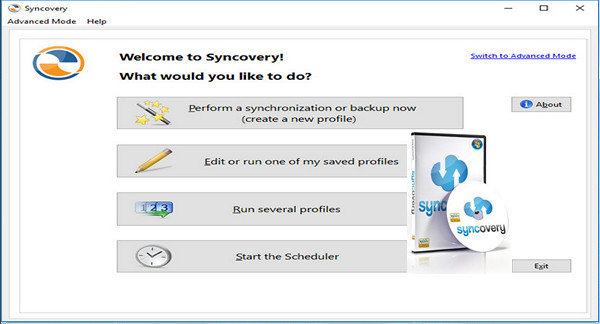
Syncovery is an application used to back up and synchronize your data. The application's advantage lies in its ability to synchronize any type of data, whether stored on a PC, Mac, server, laptop, or online storage space.
Users can choose the user interface that best suits them: Assistant Mode or Advanced Mode. Settings are stored in multiple profiles, and the software comes with support for FTP and Secure FTP servers, SSH, WebDAV, Amazon S3, HTTP, partial file updates, ZIP compression, data encryption, and a scheduler for automatic backups.
The scheduler can operate as a service without requiring user login. On Windows XP or later, locked files can be copied using the Volume Shadow Service.
Main features:
– Synchronizes files and entire folder structures across different locations, such as a PC and a laptop. 64-bit I/O ensures that file sizes larger than 4 GB are supported.
– Save option parameter combinations as profiles, with instant access to all saved parameters. You can even run multiple profiles with a single command.
– Detect moved files. If you reorganize your folders by moving files to different locations, Super Flexible File Synchronizer detects this and quickly performs the same actions, for example, on your laptop. No extraneous copying!
– With the scheduler. Schedule the synchronization of your data to a backup hard drive at a convenient time each day or as often as you wish.
– Intelligent and Flexible. If some files cannot be copied because other software is accessing them, the synchronizer will continue to copy the remaining files, and then retry using all the files that were locked, until all files have been successfully copied.
– Keep multiple backup versions of each file (optional) This function does not replace the backup files but renames them, until a selectable number of different backup versions is reached.
– Supported database. A special technique prevents any alteration of data during the copying of database files, including SQL Server database files.
– Multiple file masks (Inclusion and Exclusion) File masks are processed seamlessly (and quickly!). Even if you specify redundant file masks, there will be no strange side effects.
– Easy to resume when the disk is full. Simply run out of space and ask the software to continue copying. It can pause right in the middle of a file until the extra space is freed up.
– Optionally create exact mirrors. If you wish, you can optionally create an exact mirror of your data, even if this means that some files are deleted or replaced by older files.
– And much more…
Configuration:
– Windows (x32/x64 Bits): XP, Vista, 7, 8, 8.1, 10
– Processor: 3 GHz
– RAM: 512 MB
– Disk space: 100 MB
Facility :
1. Install the program via:
— For the 64-bit system –> Syncovery64Setup.exe
— For the 86-bit system –> SyncoverySetup.exe
2. Activate the program with the serial number (key.txt)
Portable Version
- Execute SyncoveryPortable.exe
- Language : English
- Size : Installable 50.4 MB / Portable 77.6 MB
Installable version
Portable version
This article was updated on January 25, 2017