Video Converter and Compressor is a powerful and versatile Android application designed to meet all your video and audio processing needs. Whether you want to convert a file, reduce its size, or make quick edits, this application offers a complete and efficient solution, suitable for both beginners and advanced users.
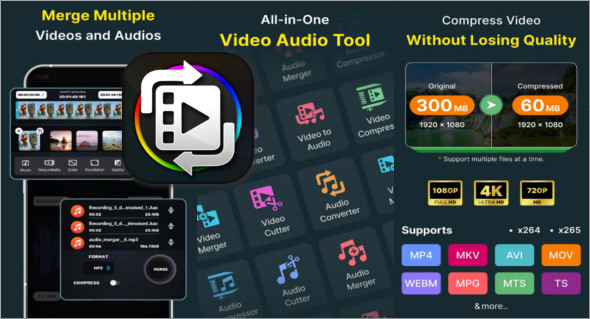
Thanks to its broad compatibility, it supports a wide variety of video formats such as MP4, MKV, AVI, MOV, FLV, WMV, and many more. It also allows you to convert video files to popular audio formats like MP3, AAC, WAV, or OGG. This flexibility makes the application ideal for extracting music, creating audio files, or adapting videos for different devices.
One of Video Converter and Compressor's major strengths lies in its advanced compression system. Users can significantly reduce file sizes while maintaining near-original quality, thanks to the use of high-performance codecs like H.264. It's also possible to customize several technical parameters, including resolution (from 4K to 240p), bitrate, and frames per second (FPS), allowing for precise optimization to suit specific needs.
In addition to conversion and compression, the application includes simple yet effective editing tools. You can cut, trim, or merge your videos with great precision. It also offers several blending modes, such as sequential, side-by-side, and top/bottom, making it easy to create personalized content.
On the audio side, the application also offers comprehensive features. You can convert, cut, compress, and merge your audio files while choosing advanced options such as encoding type (CBR or VBR), sample rate, or audio channel (mono or stereo). This ensures sound quality tailored to each use.
Another very useful feature is batch processing, which allows you to process multiple files simultaneously. This represents a considerable time saving, especially for users who regularly handle a large number of multimedia files.
The app also allows users to add external audio tracks and subtitles, as well as rotate or flip videos. These options offer a high degree of customization and make the experience even more complete.
If you're looking for a more advanced video editing application, you can also check out CapCut Premium, available here:
https://www.trucnet.com/capcut-premium-android/
10 Features of Video Converter and Compressor
- Multi-format video conversion
Allows you to convert videos to many formats such as MP4, MKV, AVI, MOV or FLV with great speed. - Video to audio conversion
Easily convert your videos into audio files such as MP3, AAC, WAV or OGG. - Advanced video compression
Reduces video file size while maintaining excellent quality. - Resolution customization
Offers a choice of resolutions ranging from 4K to 240p or custom. - Frame Rate (FPS) Adjustment
Allows you to adjust the fluidity and size of the videos according to your needs. - Built-in video editing
Includes tools for precisely cutting, trimming, and editing videos. - Video merging
Allows you to combine multiple videos into one with different styles. - Audio and subtitle track management
Easily add or edit audio tracks and subtitles. - Batch processing
Allows you to process multiple files at the same time to save time. - Full audio editor
Offers tools to convert, cut, merge and compress audio files.
Version : 19.0.0
Size : 76.60 MB
Compatibility: Android 10 or More
Download Video Converter and Compressor v19.0.0
This article was last updated on April 7, 2026