If you're looking for the easiest way to get rid of some of the pre-installed Windows 10 apps, this little utility is probably the best "answer".
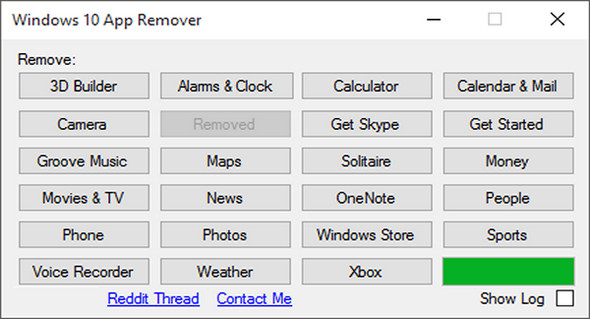
Windows 10 App Remover is a software capable of helping you remove some of the pre-installed applications from Windows 10, without needing a complicated command-line method or PowerShell.
First, this potentially useful utility is capable of removing the following applications: 3D Builder, Alarms & Clock, Calculator, Calendar & Mail, Camera, Get Office, Get Skype, Start, Groove Music, Maps, Solitaire, Money, Movies & TV, News, OneNote, People, Phone Companion, Photos, Windows Store, Sports, Voice Recorder, Weather, and Xbox.
The application's "modus operandi" is relatively simple; it allows you to reinstall applications with just a mouse click. However, please note that this method is highly experimental and its success rate is quite low.
It requires no installation whatsoever, and doesn't even require full administrative privileges to work its magic. In fact, running it with administrative privileges can actually discourage its functionality.
Although we found the application very well maintained, keep in mind that it is an unofficial application and as with most things.
New in Windows 10 App Remover 1.2:
Reinstalling programs, but this feature is known not to work every time.
Configuration:
– Windows (x32/x64 Bits): 10
– Processor: 1 GHz
– RAM: 512 MB
– Disk space: 1 GB
Portable version:
Run the file WXAR_1.2.exe
Language : English
Size : 0.83 MB
This article was updated on March 12, 2017