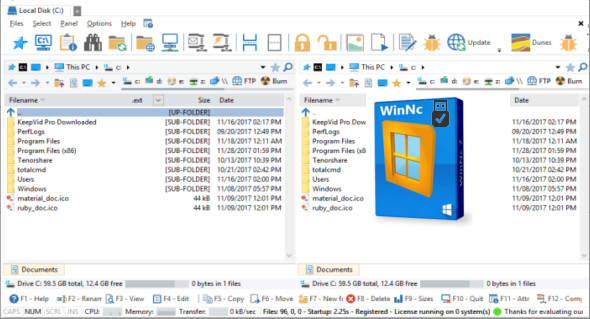
WinNC is a program designed to speed up file transfer and make file management easy. It displays two panes allowing you to view the contents of two folders simultaneously, simplifying file movement and search.
WinNC is a tabbed file manager specifically developed for Windows 10.
WinNC remains compatible with Windows 8 and 7 and uses the modern flat interface. This NC clone file manager is inspired by the dual-pane design of the older Norton Commander file manager. It has shortcuts to all the special folders in Windows 10, and the tabbed interface lets you organize your data by project. Projects can include virtual links to files and folders across the entire disk linked to that project tab. With its new flat Windows 10 interface, WinNC can perform all the basic tasks you expect from a file manager, such as copying, moving, deleting, compressing, decompressing, and creating links. But WinNC also converts audio, burns files to DVDs and CDs, creates ISO files, and lets you synchronize your files. From ZIP files, it allows the creation of self-extracting .exe files.
File manager actions
File actions in the WinNC file manager use color-coded indicators so you can easily see if a file is being copied (green), moved (orange), or compressed (yellow). WinNC allows you to multitask by setting the maximum number of parallel tasks to run simultaneously. Otherwise, WinNC will wait to start the next action until the previous one is complete. There is a built-in folder viewer that supports all popular formats. It also includes a built-in slideshow viewer, audio player, and video player for quickly browsing your media.
Quick access to file management
WinNC will keep track of the folders you have worked in in the past. You can quickly access these folders by clicking the Quick Access icon or pressing the spacebar.
Next, in the Quick Access area, start by typing the location you are interested in, for example "windows" or "download" or "projectfolder".
It will display a list of matching folders sorted by match rank. Additionally, you can favorite frequently used folders by tapping the blue star, and you can also add more tags (search terms) to the actual folder.
What's new :
* Fixed an issue with the FTP startup path
* FTP information field correctly saved
* Password problem fixed
* Other minor bug fixes
Configuration:
– Windows (x32/x64 Bits): XP, Vista, 7, 8, 8.1, 10
– Processor: 1 GHz
– RAM: 1 GB
– Disk space: 30 MB
Language Multilingual (French included)
Size : 12.6 MB
This article was updated on April 13, 2018