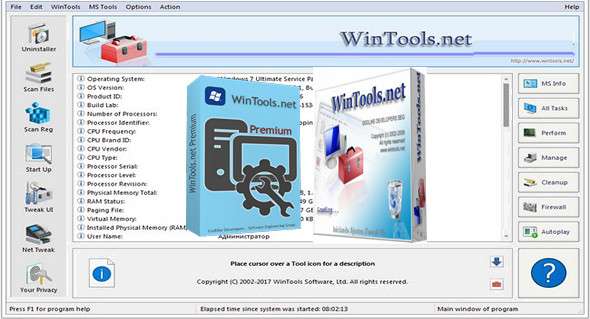
WinTools.net Professional is a suite of tools for optimizing the Windows operating system and increasing performance. This suite allows you to cleanly remove unwanted software from disk drives and dead entries from the Windows registry. WinTools.net Professional lets you control the Windows startup process, monitor memory usage, and customize desktop and system settings to suit your needs. Furthermore, it ensures your privacy and secures sensitive information, and improves the speed and stability of your internet connection.
WinTools.net Professional contains tools such as: Clean Uninstaller, File Analyzer, Shortcut Analyzer, Registry Scan, Startup Manager, UI Tweak, Net Tweaker, Privacy, Invisible Man, File Shredder…
Cleaning and uninstallation
Used both to properly remove the software and to monitor changes to the hard drive, MS Windows registry, and system files during program installations.
File analysis
Used for the periodic cleaning of your hard drive from dead references, junk, and obsolete files produced by various software programs. These files and references remain on the hard drive and increase drive access time.
Analysis of shortcuts
Used for the periodic cleanup of your desktop, Start menu, application data, and hard drives by removing dead shortcuts. These shortcuts remain on the hard drive and increase drive access time.
Registry Scan
Used for periodic cleaning of the MS Windows registry of unused applications remaining after uninstallation and invalid references that reduce system speed and system load time.
Startup Manager
This tool allows you to monitor, add, remove, enable, and/or disable individual startup items. You can also adjust the applications that are initialized during the operating system loading process.
Tweak UI
This is a set of additional adjustments related to security, system capacity, and user preferences that are not included in the core components of MS Windows.
Tweaker
This tool is used to increase data transfer speeds and improve connection stability by modifying hidden network settings. It is only available in the "Professional" edition.
Your privacy
This is a suite of tools that guarantee your confidentiality and protect sensitive information. Available only in the "Professional" edition.
Invisible Man
This tool is used to save private information and for its later restoration. This is useful if you do not want information to be saved by the system.
File shredder
This tool is used to securely delete documents, programs, and any other files without the possibility of restoring them.
IE Favorites
Small tools to quickly delete, back up, and restore Internet Explorer favorites. Remove unused or broken links.
RAM Memory Booster
This tool is used for monitoring, cleaning, and optimizing RAM. It's used to increase operating system performance and free up RAM for other processes. If possible, we recommend using RAM Saver Pro instead of RAM Memory Booster.
Configuration:
– Windows (x32/x64 Bits): XP, Vista, 7, 8, 8.1, 10
– Processor: 1 GHz
– RAM: 1 GB
– Disk space: 10 MB
Language Multilingual (including French)
Size : 4.0 MB
This article was updated on December 26, 2017